Parallel Execution
Execution Modes Overview
Mode |
Description |
|---|---|
Serial |
Single CPU thread, useful for debugging and small meshes |
OpenMP |
Shared-memory parallelism using CPU threads |
CUDA |
NVIDIA GPU acceleration |
HIP |
AMD GPU acceleration |
MPI |
Distributed-memory parallelism across multiple compute nodes |
MPI + GPU |
Distributed parallelism with GPU acceleration on each rank |
Serial Execution
For serial execution, run the cocoa executable directly:
./cocoa -i simulation.yaml
OpenMP Parallelism
When Cocoa is compiled with OpenMP support via Kokkos, you can control the number
of threads using the --kokkos-num-threads option:
./cocoa -i simulation.yaml --kokkos-num-threads=8
Alternatively, use the OMP_NUM_THREADS environment variable:
export OMP_NUM_THREADS=8
./cocoa -i simulation.yaml
At present the OpenMP backend is generally slower than the same simulation run with the serial execution space plus MPI: the OpenMP code uses atomics, which the serial-plus-MPI path avoids.
GPU Execution
For GPU builds (CUDA or HIP), Cocoa automatically uses the default GPU device. To select a specific GPU:
# Using Kokkos option
./cocoa -i simulation.yaml --kokkos-device-id=0

# Or using environment variable (CUDA)
export CUDA_VISIBLE_DEVICES=0
./cocoa -i simulation.yaml
MPI Distributed Parallelism
Under MPI the mesh is partitioned across ranks, possibly on several compute nodes, and each rank owns one subdomain.
A partitioned run reproduces the serial run up to round-off from summing in a different order. Every value a rank reads at a partition cut is combined over the ranks that share it first: ghost nodes take their owners’ values, each element-to-node wet/dry result is combined over all ranks (including at a cold start), lateral stress is summed over ranks before it is normalized, and the implicit solver eliminates open-boundary columns on the rank that computed each entry.
Fig. 10 Distributed execution model with ghost exchange between two MPI ranks
Requirements
Cocoa must be built with MPI support (Trilinos compiled with MPI enabled)
A partition file, which Cocoa creates on the first run if none exists (see Creating Partition Files)
Basic MPI Execution
To run with MPI:
mpirun -np 4 ./cocoa -i simulation.yaml --partition partition.nc
The --partition option specifies the partition file that defines how the mesh
is distributed across MPI ranks. If the file exists, it will be loaded. If it does
not exist, Cocoa creates it with ParMETIS.
Note
On a GPU build, Cocoa runs the Kokkos host backend on one thread per rank.
Left at the default of one thread per core, those threads would compete
with the thread that launches the GPU kernels. Nothing needs to be passed
for this. --kokkos-num-threads=N or KOKKOS_NUM_THREADS overrides it.
Mesh Partitioning
Fig. 11 Mesh partitioning pipeline from input mesh to distributed execution
Cocoa partitions the mesh with ParMETIS (via Trilinos/Zoltan2), a graph partitioner that balances load across ranks while minimizing communication.
Mixed-Element Meshes
A quadrilateral costs roughly 1.8 times a triangle’s assembly work, so when a
mesh has quadrilaterals the partitioner weights each one 1.8. On the segregated
60x20 channel strip (channel_segregated_strip.nc: all triangles on one half,
all quadrilaterals on the other) an unweighted 4-rank partition splits
448/455/451/446 elements but 494/315/238/234 owned nodes (imbalance 1.54).
Measured per-step time on that mesh (3600 steps, median of three) was 4.453 s
unweighted, 4.238 s at weight 1.33 and 4.184 s at 1.8 (owned-node imbalance
1.09); at 2.5 the imbalance rises again to 1.15. Weight 1.8 is about 6 %
faster than unweighted. Triangle-only meshes, and their partition caches, are
unaffected.
Balancing Wet Work
By default the partition balances elements. Much of each time step works only
where there is water, so on a mesh with large dry areas one rank can hold most
of the wet nodes while another waits for it. mesh.partition.wet_balance balances the nodes that start wet
as well:
mesh:
  partition:
    wet_balance: initial_condition   # or none, or a level in metres
initial_conditionThe wet set the run starts from. A cold start applies the same rule as the circulation: wet where the total depth with the configured initial water level exceeds
physics.h0, and dry whereversurface_submergence_stateis 1. A restart reads the wet/dry state in the restart file.- a number
Ground below that level above the datum counts as wet.
none(default)Elements only.
The partition then gives each rank an even share of both the elements and the wet nodes, each within 1 % of the mean (the unweighted default allows 5 %). The tighter tolerance matters because the step alternates phases that each wait for the slowest rank: on global STOFS with two GPUs, 5 % left one rank 11 % heavier in owned nodes, which the solver’s every iteration waited on. It changes only the partition, so results move by round-off, as they do between any two rank counts.
Partition File Format
Partition files are NetCDF and contain:
Variable or attribute |
Contents |
|---|---|
|
Geographic coordinates of all nodes |
|
Element node indices: three columns on a triangle-only mesh and four on
a hybrid one, where a triangle row’s unused fourth column carries the
variable’s |
|
MPI rank that owns each node |
|
MPI rank that owns each element |
Per-rank data |
Each rank’s owned and ghost node ids and owned elements, which a run loads directly |
|
Fingerprint of the mesh the partition was built for (see Mesh Identification) |
|
The |
Automatic Partition Naming
When no explicit partition file is provided, Cocoa uses the naming convention:
<mesh_filename>.partition_<N>.nc
For example, with mesh.nc and 8 MPI ranks, the partition file would be:
mesh.nc.partition_8.nc
Creating Partition Files
An MPI run creates its partition file when the file does not exist. The
--create-partition option creates one ahead of time.
Pre-computing Partitions
For large meshes, pre-compute the partition file before the production run so the run does not pay the partitioning overhead:
# Create a partition file for 8 subdomains
./cocoa -i simulation.yaml --create-partition 8
This command will:
Read the mesh file specified in
simulation.yamlPartition the mesh into 8 subdomains using ParMETIS
Save the partition to
<mesh_filename>.partition_8.ncExit without running the simulation
To specify a custom output filename:
./cocoa -i simulation.yaml --create-partition 8 --partition my_partition.nc
Note
Creating a partition file needs only one process. The partitioner uses MPI if available but works with a single rank.
Partition Caching
Cocoa caches partition files to avoid re-partitioning on subsequent runs. The cache records the mesh id, which validates the partition against the current mesh. If the mesh changes in any way the id covers (coordinates, depth, connectivity or element order, boundaries, nodal attributes, SAL data), or the rank count differs, the cache does not match; Cocoa computes a new partition and writes it over the file.
A cache records the wet_balance rule it was built with in its
partition_weighting attribute. A run that asks for a different rule still
uses the cached partition, and logs a warning naming both rules; delete the
file to rebalance. Caches written before Cocoa 0.6.0 record no rule and are
reused without a warning.
To force regeneration of a partition file, delete the existing file:
rm mesh.nc.partition_8.nc
mpirun -np 8 ./cocoa -i simulation.yaml
Example Partition Visualization
A ParMETIS partition of the global ocean mesh (GSTOFS domain) into 256 subdomains, one color per rank:
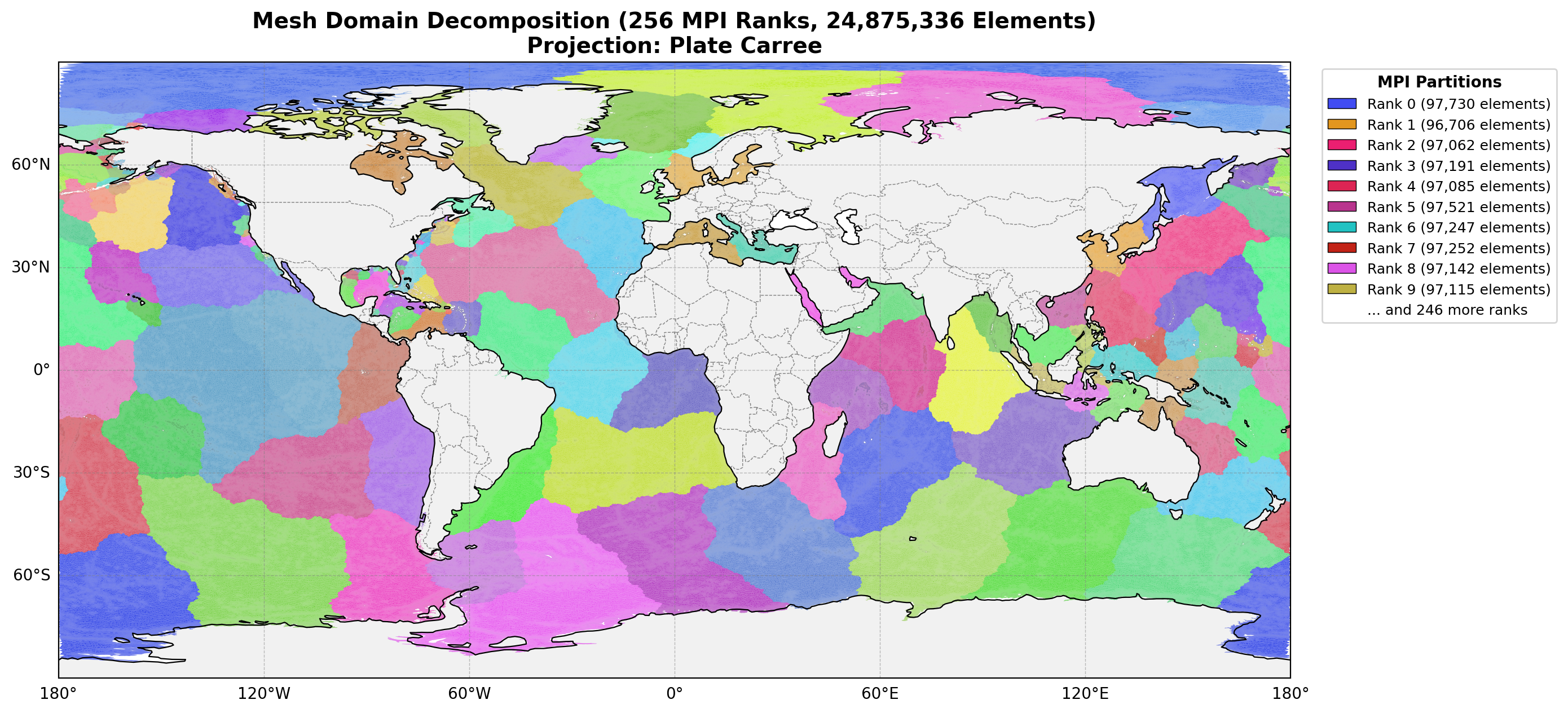
Fig. 12 Example mesh partition for a global ocean model, with 256 subdomains.
Internal Weir Pairs Across Partitions
ADCIRC requires that both sides of an internal weir boundary be assigned to the same MPI subdomain. This constraint simplifies the overflow computation (each rank has direct access to both pair elevations) but restricts the partitioner, potentially leading to load imbalance near weirs.
Cocoa has no such constraint: internal weir pair nodes may be owned by different MPI ranks, and the ghost exchange supplies each rank with the data it needs from the other side.
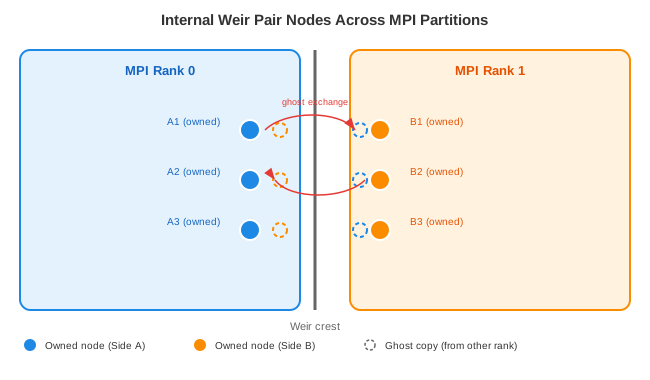
Fig. 13 Weir pair nodes on opposite sides of a partition boundary. Each rank holds ghost copies of the other rank’s nodes, with the same elevation and wet/dry status as their owners, so both ranks see the same pair state.
The mechanism has four parts:
Pair nodes across a weir do not share elements, so the ordinary ghost layer would not contain them. Partitioning adds the pair of every owned internal weir node to that rank’s ghost set.
The GWCE solution reaches every ghost copy, and the wet/dry pass combines every element-to-node result over all ranks before reading it, so every copy of a node, weir pair nodes on other ranks included, leaves the pass with the same elevation (\(\zeta^{n+1}\)) and wet/dry status as its owner.
Each rank therefore has the elevation at both its owned boundary nodes and their pair nodes, and runs the overflow formula on local data. Both sides of the weir are listed as boundary nodes in the mesh, so both ranks compute their own QFORCE contributions.
A boundary segment that spans a partition boundary may have a ghost node as one endpoint. QFORCE is added to the GWCE RHS only at owned nodes, so each contribution is applied once, by the rank that owns the node.
At startup each rank checks that every owned internal weir node has its pair node available locally, and stops with an error if one does not.
Command Line Reference
Cocoa Options
Option |
Description |
|---|---|
|
Input configuration file (YAML format). Required; the file must exist |
|
Use specified partition file. If file exists, load it; otherwise create it |
|
Create partition for N subdomains and exit (no simulation) |
|
Enable verbose logging (debug level) |
|
Show the execution space and device a run would use (on a GPU, the device and the target the build was compiled for), then exit |
|
Show version information and exit |
|
Show help message |
Note
Under an MPI launcher, command-line errors and --help,
--version and --device-info output are printed by rank 0 only
(detected from the launcher’s rank environment variables before
MPI_Init); every rank still exits with the same status code.
Kokkos Options
Option |
Description |
|---|---|
|
Number of threads for OpenMP execution |
|
GPU device ID to use (0-indexed) |
|
Map device ID by |
|
Enable Kokkos warning messages |
|
Show all Kokkos command line options |