Global Simulations
Global ocean simulations raise two problems regional coastal models do not. The shallow water equations are singular at the geographic poles, where meridians converge and the metric term \(\tan\phi / R_e\) diverges. And elements that span the \(\pm 180\)° longitude line have coordinate discontinuities that break geometry calculations unless handled. Scale factors and metric corrections also matter more when the domain spans a large range of latitude.
Cocoa detects and unwraps elements straddling the antimeridian during mesh initialization, with no configuration. For the poles it offers an optional coordinate rotation that moves the computational poles away from the geographic poles.
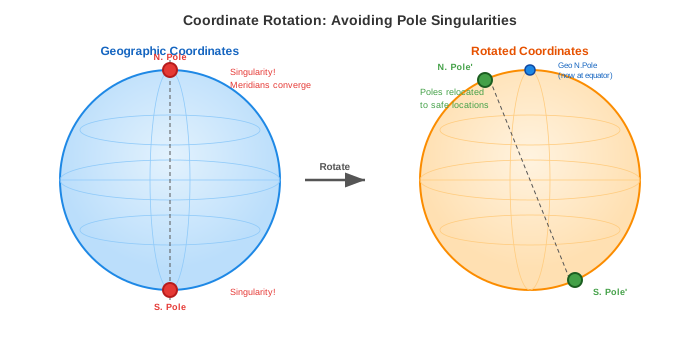
Fig. 9 Coordinate rotation relocates the computational poles (singularities) from the geographic poles to other positions, usually over land, away from the modeled ocean.
When to Use Coordinate Rotation
Coordinate rotation is required when your global mesh includes elements near the geographic poles (typically within 5-10 degrees of \(\pm 90\)° latitude). Without rotation, simulations will experience:
Numerical instability from near-singular metric terms
Time step restrictions due to converging meridians
Degraded solution quality in polar regions
Coordinate rotation is not required for:
Regional models (any latitude range)
Global models that exclude polar regions (e.g., \(\pm 80\)° latitude bounds)
Configuration
Basic Global Mesh Setup
A minimal configuration for a global simulation without rotation:
mesh:
  filename: "global_mesh.nc"
  projection:
    type: "Mercator"
    center: [0.0, 0.0]  # Centered on equator

simulation:
  start_time: 2025-01-01
  end_time: 2025-02-01
  time_step: 60s  # Global models often need larger time steps

physics:
  manning_n: 0.025
  tau0: 0.005
The projection center [0.0, 0.0] places the reference point at the
intersection of the prime meridian and equator, which is typical for global
models.
Global Mesh with Coordinate Rotation
For global models including polar regions, enable coordinate rotation:
mesh:
  filename: "global_mesh_with_poles.nc"
  projection:
    type: "Mercator"
    center: [0.0, 0.0]
  rotation:
    enabled: true
    pole_location: [0.0, 0.0]  # New pole at (lon=0, lat=0)
The pole_location specifies where the geographic North Pole is relocated
in the rotated coordinate system. This uses the same format as ADCIRC’s
znorth_in_spherical_coors in the fort.rotm file.
Common choices:
Pole Location |
Effect |
|---|---|
|
North Pole moves to equator at prime meridian |
|
North Pole moves to equator at date line |
|
North Pole moves to equator in Atlantic |
Choosing a Pole Location
When selecting the pole location, consider:
The new poles carry the numerical singularities, so place them where solution accuracy matters least: over land the mesh excludes (e.g., Antarctica or northern Canada), or in deep ocean far from your study area.
If your mesh was generated with ADCIRC’s rotated pole system (IFSPROTS=1), use the same pole location in Cocoa.
Understanding Rotation Effects
When coordinate rotation is enabled, several quantities are affected:
Coordinates
All node coordinates are transformed from geographic \((\lambda, \phi)\) to rotated \((\lambda', \phi')\) coordinates. The mesh file remains unchanged; transformations happen at runtime.
Coriolis Parameter
The Coriolis parameter \(f = 2\Omega\sin\phi\) uses the geographic latitude \(\phi\), not the rotated latitude \(\phi'\). The Coriolis effect depends on the component of Earth’s rotation vector along the local vertical, and rotating the coordinate system does not move either one: the rotation matrix \(R\) is orthonormal, so the rotated pole direction \(R\hat{z}\) and the rotated local vertical \(R\hat{r}\) have the same dot product as \(\hat{z}\) and \(\hat{r}\) did, namely \(\sin\phi\). Cocoa evaluates the rotated-frame form \(f = 2\Omega\,(R\hat{z})\cdot\hat{r}'\) on rotated meshes, which is the same number to machine precision.
Metric terms are the opposite case. The spherical correction \(\tan\phi/R_e\) and the projection scale factors are properties of the coordinate system the equations are discretized in, so they use the rotated latitude \(\phi'\). The metric term is what becomes singular at the pole, and pole rotation removes that singularity only if the term is evaluated in the rotated frame.
Tidal Potential
Tidal potential forcing (gravitational attraction from the Moon and Sun) uses geographic latitude \(\phi\), because the potential depends on the actual position relative to the Moon and Sun.
Vectors
Velocities are computed in the rotated coordinate frame (rotated east/north
directions), and the baroclinic pressure gradient is rotated into that frame
when it is read. For output, Cocoa transforms both back to the geographic
frame, so ucx/ucy and bpg_effective_x/bpg_effective_y are
true eastward and northward components. Wind is stored in the geographic
frame and needs no transform.
Projection Selection
For global simulations, projection choice affects numerical accuracy. The
first column is the mesh.projection.type value:
Projection |
Recommendation |
|---|---|
|
Best for global models with rotation. Conformal (angle-preserving) properties are important for accurate velocity calculations. Requires rotation if including high latitudes. |
|
Acceptable for global models. Simple but introduces errors at high latitudes. |
|
Good for mass conservation, but distorts shapes. Use when accurate integrated quantities are more important than local accuracy. |
|
A compromise between Mercator and cylindrical equal-area. Moderate distortion at all latitudes. |
|
Cylindrical projection with two standard parallels at 45 degrees. Moderate distortion compromise. |
Complete Example
A complete configuration for a global ocean model with tidal potential forcing, self-attraction and loading (SAL), and spatially varying friction. This corresponds to the Global Ocean test case:
output:
  global:
    step_interval: 5

diagnostics:
  screen_interval: 60
  log_file: log.json

mesh:
  filename: "global.nc"
  projection:
    type: "Mercator"
    center: [0.0, 45.0]
  rotation:
    enabled: true
    pole_location: [114.16991, 0.77432]

simulation:
  start_time: 2025-01-01
  end_time: 2025-02-01
  time_step: 12m

physics:
  manning_n: "mesh"
  cf_lower_limit: 0.0010
  tau0: 0.0022222
  smagorinsky_coefficient: 0.2
  min_viscosity: 1.0e-6

numeric:
  solver: implicit
  gwce_coefficients: [0.5, 0.5, 0.0]

forcing:
  ramp:
    enabled: true
    duration: 5d
  tide:
    sal:
      enabled: true
    potential:
      enabled: true

initial_conditions:
  water_level: 0.0
In this configuration:
Coordinate rotation relocates the North Pole to
[114.16991, 0.77432], placing the singularity over land (Borneo).The Mercator projection is centered at 45°N.
manning_n: "mesh"reads Manning’s n from a mesh variable instead of using a uniform value.tide.sal.enabled: trueapplies the self-attraction and loading correction to the tide.Tide potential is enabled without a constituent list, so Cocoa computes it astronomically from Moon and Sun positions (see Tidal Forcing).
The implicit solver with
gwce_coefficients: [0.5, 0.5, 0.0]allows the 720-second time step.There is no tidal boundary section, because a global mesh has no open boundaries.
See Also
Coordinate Rotation - Mathematical details of the rotation system
Longitude Branch Cut - How elements across the longitude branch cut are unwrapped
Mesh Preparation - Creating mesh files for Cocoa