Parallel Execution
Cocoa supports multiple levels of parallelism for efficient execution on modern computing systems. This guide covers serial execution, shared-memory parallelism via OpenMP/CUDA/HIP, and distributed-memory parallelism via MPI.
Execution Modes Overview
Cocoa can be run in several configurations:
Mode |
Description |
|---|---|
Serial |
Single CPU thread, useful for debugging and small meshes |
OpenMP |
Shared-memory parallelism using CPU threads |
CUDA |
NVIDIA GPU acceleration |
HIP |
AMD GPU acceleration |
MPI |
Distributed-memory parallelism across multiple compute nodes |
MPI + GPU |
Distributed parallelism with GPU acceleration on each rank |
Serial Execution
For serial execution, simply run the cocoa executable directly:
./cocoa -i simulation.yaml
This is useful for:
Debugging numerical issues
Small test cases
Systems without MPI or GPU support
OpenMP Parallelism
When Cocoa is compiled with OpenMP support via Kokkos, you can control the number
of threads using the --kokkos-num-threads option:
./cocoa -i simulation.yaml --kokkos-num-threads=8
Alternatively, use the OMP_NUM_THREADS environment variable:
export OMP_NUM_THREADS=8
./cocoa -i simulation.yaml
Note that at present, atomics make the OpenMP code generally slower than an equivalent simulation running using the serial execution space and MPI, which avoids the atomics.
GPU Execution
For GPU builds (CUDA or HIP), Cocoa automatically uses the default GPU device. To select a specific GPU:
# Using Kokkos option
./cocoa -i simulation.yaml --kokkos-device-id=0

# Or using environment variable (CUDA)
export CUDA_VISIBLE_DEVICES=0
./cocoa -i simulation.yaml
MPI Distributed Parallelism
For large-scale simulations, Cocoa supports distributed-memory parallelism via MPI. This allows the mesh to be partitioned across multiple compute nodes, with each MPI rank responsible for a subdomain of the mesh.
Fig. 5 Distributed execution model with ghost exchange between two MPI ranks
Requirements
Cocoa must be built with MPI support (Trilinos compiled with MPI enabled)
A partition file must be created or provided
Basic MPI Execution
To run with MPI:
mpirun -np 4 ./cocoa -i simulation.yaml --partition partition.nc
The --partition option specifies the partition file that defines how the mesh
is distributed across MPI ranks. If the file exists, it will be loaded. If it does
not exist, Cocoa will create it automatically using ParMETIS.
Important
When using MPI with GPU acceleration, set --kokkos-num-threads=1 to avoid
oversubscription:
mpirun -np 4 ./cocoa -i simulation.yaml --partition partition.nc --kokkos-num-threads=1
Mesh Partitioning
Fig. 6 Mesh partitioning pipeline from input mesh to distributed execution
Cocoa uses ParMETIS (via Trilinos/Zoltan2) for mesh partitioning. The partitioner uses graph-based algorithms to minimize communication while balancing the computational load across MPI ranks.
Partition File Format
Partition files are stored in NetCDF format and contain:
Node coordinates (
node_x,node_y): Geographic coordinates of all nodesElement connectivity (
element_nodes): Triangular element node indicesNode ownership (
node_owner): MPI rank that owns each nodeElement ownership (
element_owner): MPI rank that owns each elementMesh checksum: Hash for validating mesh consistency
The partition file is automatically validated against the mesh to ensure consistency. If the mesh changes, a new partition file must be generated.
Automatic Partition Naming
When no explicit partition file is provided, Cocoa uses the naming convention:
<mesh_filename>.partition_<N>.nc
For example, with mesh.nc and 8 MPI ranks, the partition file would be:
mesh.nc.partition_8.nc
Creating Partition Files
Partition files can be created in two ways:
Automatic creation: When running with MPI and the partition file doesn’t exist
Pre-computation: Using the
--create-partitionoption
Pre-computing Partitions
For large meshes, it’s recommended to pre-compute partition files before running simulations. This avoids the partitioning overhead during production runs:
# Create a partition file for 8 subdomains
./cocoa -i simulation.yaml --create-partition 8
This will:
Read the mesh file specified in
simulation.yamlPartition the mesh into 8 subdomains using ParMETIS
Save the partition to
<mesh_filename>.partition_8.ncExit without running the simulation
To specify a custom output filename:
./cocoa -i simulation.yaml --create-partition 8 --partition my_partition.nc
Note
Creating partition files only requires serial execution. The partitioner will use MPI if available but works correctly with a single rank.
Partition Caching
Cocoa caches partition files to avoid re-partitioning on subsequent runs. The cache includes a mesh checksum that validates the partition against the current mesh. If the mesh changes (nodes added/removed, connectivity modified), the cache is invalidated and a new partition must be generated.
To force regeneration of a partition file, delete the existing file:
rm mesh.nc.partition_8.nc
mpirun -np 8 ./cocoa -i simulation.yaml
Example Partition Visualization
The following image shows an example ParMETIS partition of a global ocean mesh (GSTOFS domain) with 8 subdomains. Each color represents a different MPI rank’s subdomain:
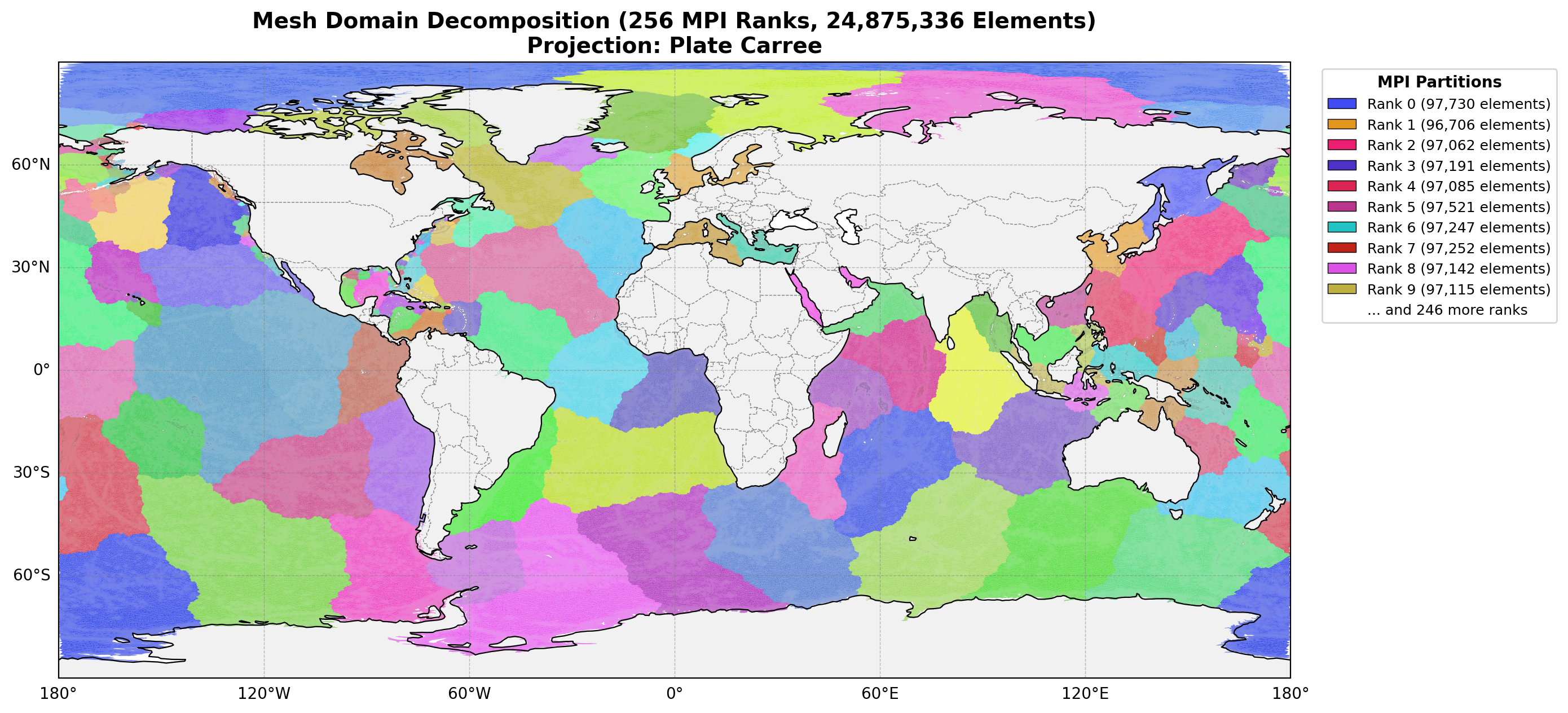
Fig. 7 Example mesh partition for a global ocean model. The mesh is divided into 256 subdomains
Internal Weir Pairs Across Partitions
ADCIRC requires that both sides of an internal weir boundary be assigned to the same MPI subdomain. This constraint simplifies the overflow computation (each rank has direct access to both pair elevations) but restricts the partitioner, potentially leading to load imbalance near weirs.
Cocoa removes this constraint entirely. Internal weir pair nodes may be owned by different MPI ranks because the ghost exchange mechanism already provides the necessary data.
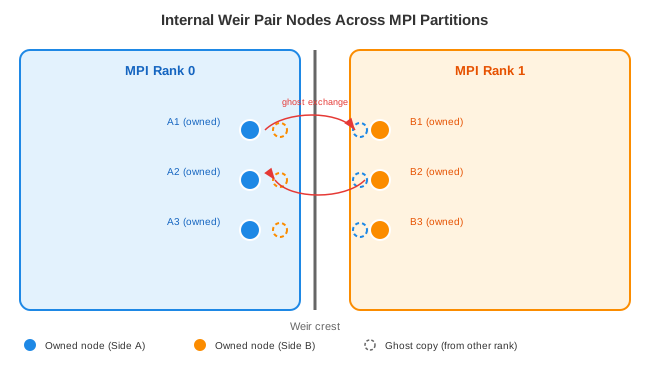
Fig. 8 Weir pair nodes on opposite sides of a partition boundary. Each rank holds ghost copies of the other rank’s nodes. The ghost exchange before the overflow computation ensures both ranks have up-to-date elevation and wet/dry status for their pair nodes.
How it works:
Ghost layer inclusion: Pair nodes on the opposite side of a weir share elements near the crest, so they are automatically included in the ghost layer during mesh partitioning.
Ghost exchange timing: Each timestep,
exchange_wetdry_ghosts()runs before the overflow computation. This exchanges elevation (\(\zeta^{n+1}\)) and wet/dry status for all ghost nodes, including weir pair nodes on other ranks.Independent computation: After the ghost exchange, each rank has the elevation at both its owned boundary nodes and their pair nodes (as ghost copies). The overflow formula runs independently on each rank using local data. Since both sides of the weir are listed as boundary nodes in the mesh, both ranks compute their own QFORCE contributions.
Bounds-checked RHS application: When applying QFORCE to the GWCE RHS, boundary segments that span partition boundaries may have one endpoint that is a ghost node. The kernel skips writes to ghost nodes (via a bounds check against the owned RHS size), so each contribution is applied only by the rank that owns the node.
Runtime validation:
At startup, BoundaryProcessor verifies that all internal weir pair node IDs
are valid (not -1) in the local partition’s global-to-local map. If a pair node
is missing from the ghost layer, an error is logged. This would indicate a
partitioning bug since weir pair nodes should always be in the ghost set.
Command Line Reference
Cocoa Options
Option |
Description |
|---|---|
|
Input configuration file (YAML format) |
|
Use specified partition file. If file exists, load it; otherwise create it |
|
Create partition for N subdomains and exit (no simulation) |
|
Enable verbose logging (debug level) |
|
Show version information and exit |
|
Show help message |
Kokkos Options
Option |
Description |
|---|---|
|
Number of threads for OpenMP execution |
|
GPU device ID to use (0-indexed) |
|
Map device ID by |
|
Show all Kokkos command line options |